Import or Export User Objects
User objects can be shared with other TZ iBoat users via the export feature.
Sharing all your User Objects (filtered or not by category)
If you want to share all of your user objects or all user objects of a specific category (all your routes, or all your marks, ….) you can click on the “TZ” button located on the top left and select “Export”. A window will appear, select "Export" Tab and then select the format and the type of user object you want to export. Choose “GPX” when you want to share Marks or Routes with another application which supports the GPX format (note that boundaries and photos are not supported by this format). Choose “TZD” when you want to share Marks, Routes or Boundaries with an old TimeZero software (that only supports the older TZD format). If you want to share user objects with another TZ iBoat users or a recent TimeZero platform, select “TZX” which is the latest format and supports all user objects:
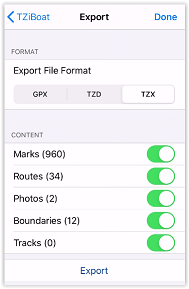
When you tap “Export”, the standard sharing interface on your device will open, allowing you to send the file via email, SMS, or any compatible app.
Sharing just one object
Sometimes you only need to export and share a single object (a route for example). For these cases, just tap on the object from the chart screen and select “Export” from the Pop-Up menu:
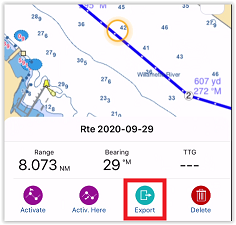
The same standard iOS or Android OS sharing interface will appear and will allow you to share the file via e-mail, or SMS, or any other App on your device that supports file attachment.
Importing User Objects
To import user data into TZ iBoat, you can proceed in two possible ways:
By selecting a file from the Import/Export window
Press the "TZ" button located in the upper left corner and select "Import/Export". A window will appear on the screen; select the "Import" tab, then press the "Import" button and select a file to open.
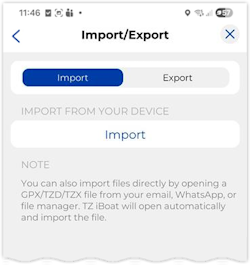
By tapping on a file received via email, airdrop, or iCloud
When you receive a TZX, TZD or GPX file via text message, e-mail, airdrop or from iCloud drive, you can just tap on it to open it with TZ iBoat. This will import (merge) the file content with your database.

When you tap the file on Android, it will automatically open in TZiBoat.
iOS will ask to select the App you want to use. If you do not see TZ iBoat in the list, select “More” and “Copy to TZ iBoat”:
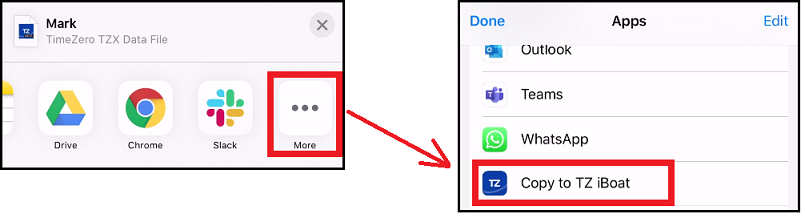
This will open TZ iBoat and display the import window:
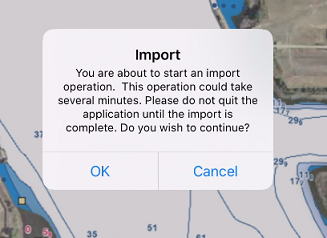
Tap “OK” to validate. After importing (merging) the data, TZ iBoat will display a window letting you know the type and number of user objects that were imported.