Multi-Sounder Display
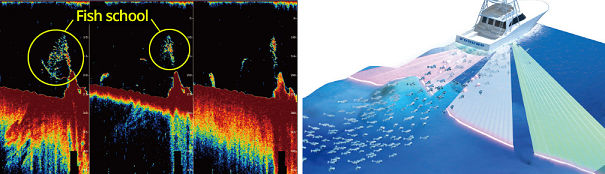
The Multi-Sounder operates like a traditional Sounder, but instead of having only one beam (under your boat), two additional beams (port and starboard) are displayed on the screen. The Triple Beam display helps to understand the depth of fish targets and the seabed condition in each direction, as well as the direction the target fish are moving. Each beam angle and beam width are selectable:
The multi-sounder operates much like a traditional sounder display scrolling from left to right. It is possible to scroll back to view past echo by clicking and dragging on the sounder picture. To go back to real time display, you can either click on the "Center On" button located in the Toolbar or right click anywhere on the sounder picture and select "Exit History":
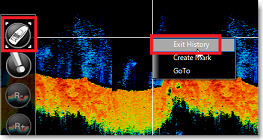
Note: The Multi-Sounder will also automatically go back to real time view after 5 minutes of inactivity or after changing WorkSpace.
If you left click anywhere on the sounder picture, a tooltip indicating the depth, echo strength, range (distance in between your vessel and cursor on sounder) and time since that echo was detected will appear on screen:
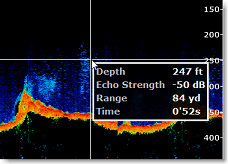
It is also possible to double click on the echo to create a mark at that location (you can also select the "Mark" tool in the Toolbar). The mark will be available permanently on the chart (until you delete it) and will contain the depth at which it was created.