PBG Filters
Both single beam and multibeam echo sounders can occasionally produce unreliable depth measurements. These errors are an inherent limitation of acoustic sounding technology and can occur even when the system is properly installed and configured.
Common causes of erratic or incorrect depth values include thermoclines, schools of fish, or other mid-water targets that may be mistakenly interpreted as the seafloor, resulting in a false bottom detection. During vessel maneuvers or at higher travelling speed, aeration and air bubbles beneath the hull can interfere with the acoustic signal, further degrading sounding quality. In addition, some single beam sounders may output invalid depth values when bottom lock is lost, sometimes latching onto unrealistically shallow values caused by the main bang or excessively deep values due to noise or signal drop-out.
To prevent poor-quality soundings from being recorded, TimeZero implements a set of filters. These filters continuously evaluate incoming depth data and automatically reject measurements that are inconsistent, unstable, or likely to be erroneous. The following sections describe each filter in detail and explain how they contribute to more reliable and accurate PBG recording.
Multibeam Filters
These filters apply to the WASSP or DFF3D multibeam sounders only.
Quality Filter (DFF3D only)
The Quality Filter applies exclusively to the Furuno DFF3D multibeam sounder and is not applicable to WASSP. The DFF3D provides a quality indicator for each individual depth measurement across the swath, allowing TimeZero to assess the reliability of every sounding in real time.
When the Quality Filter is enabled, TimeZero automatically rejects low-quality points within the swath before they are recorded. This helps remove noisy or unreliable soundings that typically occur toward the outer edges of the swath, in areas of weak signal return, or during suboptimal operating conditions.
The Quality Filter is enabled by default and it is generally recommended to leave it turned on to maintain optimal data quality. However, in some situations such as challenging bottom conditions or marginal installations, the filter may result in a significant reduction of valid points, or an unusually narrow recorded swath if low-quality measurements at the swath extremities are consistently rejected. If excessive point loss is observed, you may consider temporarily disabling this filter, while understanding that doing so may allow lower-quality data to be recorded.
Swath Consistency Filter (WASSP & DFF3D)
The Swath Consistency Filter is designed to prevent the recording of invalid multibeam data when the reported swath width is physically inconsistent with the vessel’s depth. For multibeam systems, the maximum achievable swath width is directly related to depth and beam angle. Under normal operating conditions, the swath width cannot exceed approximately four times the water depth (corresponding to a 120° total beam angle). When this limit is exceeded, it usually indicates unreliable depth data, loss of bottom lock, or acoustic interference.
When enabled, TimeZero compares the current depth value with the measured swath width. If the swath width exceeds four times the depth, the entire swath is rejected and not recorded.
Note: The depth value used as reference is the depth displayed in the NavData (not the depth from the chart). If no depth data is available, or if the depth is below 5 meters, the Swath Consistency Filter is automatically disabled.
When the filter rejects data while PBG recording is active, TimeZero displays the following notification: “PBG: data rejected (swath width inconsistent with depth)”
Deviation Filter (WASSP & DFF3D)
The Deviation Filter is designed to prevent multibeam data from being recorded when the vessel’s motion is not stable or does not align with its heading. This situation commonly occurs during sharp turns, low-speed maneuvering, or when the vessel is moving astern, all of which can negatively affect multibeam data quality.
This filter continuously compares the vessel’s Heading (HDG) with its Course Over Ground (COG). When the angular difference between these two vectors exceeds the configurable threshold, the multibeam swath is considered unreliable and is not recorded.
By default, the Deviation Filter is enabled and the rejection threshold is set to 30 degrees (adjustable from 10 to 180 degrees). Lower values result in stricter filtering, while higher values allow recording during more aggressive maneuvers.
The filter only operates when valid heading and COG data are available. If either value is missing, the Deviation Filter is automatically disabled to avoid unintended data rejection.
When the filter rejects data while PBG recording is active, TimeZero displays the following notification: “PBG: data rejected (COG/HDG deviation)”
Speed Filter (WASSP & DFF3D)
The Speed Filter prevents multibeam data from being recorded when the vessel is traveling at excessive speed. At higher speeds, aeration and turbulence beneath the hull often increase significantly. These effects can introduce acoustic interference, reduce bottom lock stability, and result in noisy or incomplete multibeam swaths. To maintain data quality, TimeZero can automatically reject multibeam data when vessel speed exceeds a defined limit.
By default, the Speed Filter is enabled with a threshold set to 15 knots. This value can be adjusted to match vessel type, installation, and operating conditions. Lower thresholds provide stricter filtering, while higher thresholds allow data recording at faster transit speeds.
When the filter rejects data while PBG recording is active, TimeZero displays the following notification: “PBG: data rejected (maximal speed filter)”
Single Beam Filters
These filter applies to single beam sounders (excluding WASSP and DFF3D).
Quality Filter (Furuno Ethernet Sounders)
The Quality Filter applies specifically to Furuno Ethernet sounders that provide raw echo data and quality information directly to TimeZero. This filter is not available for sounders that are connected to TimeZero via NMEA0183 or NMEA2000.
Furuno Ethernet sounders attach a quality indicator to each individual depth measurement, allowing TimeZero to evaluate the reliability of the detected bottom return. When the Quality Filter is enabled, TimeZero automatically rejects depth measurements with low quality, preventing unreliable or noisy soundings from being recorded.
This filter is enabled by default and is recommended for most operating conditions.
Depth Filter
The Depth Filter restricts recorded depth measurements to a user-defined range, ensuring that only values within realistic and expected limits are accepted.
This filter is particularly effective, as many common depth errors occur when the sounder loses bottom lock. In these situations, the sounder may temporarily latch onto the main bang, resulting in unrealistically shallow depths, or it may report excessively deep values while searching for a valid bottom return. Both cases can introduce significant errors into recorded data.
When the Depth Filter is enabled, TimeZero only records depth measurements that fall within the specified minimum and maximum range. By default, this range is set to 5 meters to 200 meters, providing a safe starting point for most applications.
For best results, you are strongly encouraged to adjust this range to match your typical fishing grounds, and to make the limits as tight as practical. A narrower depth range significantly improves data quality by rejecting implausible values before they are recorded.
When the filter rejects data while PBG recording is active, TimeZero displays the following notification: “PBG: data rejected (maximal depth filter)” or “PBG: data rejected (minimal depth filter)”
Speed Filter
The Speed Filter prevents depth data from being recorded when the vessel is traveling at excessive speed. At higher speeds, aeration and turbulence beneath the hull often increase significantly. These effects can introduce acoustic interference, reduce bottom lock stability, and result in noisy or false depth measurment.
By default, the Speed Filter is enabled with a threshold set to 15 knots. This value can be adjusted to match vessel type, installation, and operating conditions. Lower thresholds provide stricter filtering, while higher thresholds allow data recording at faster transit speeds.
When the filter rejects data while PBG recording is active, TimeZero displays the following notification: “PBG: data rejected (maximal speed filter)”
Consistency Filters
The Consistency with Previous Recorded Data filter is designed to prevent sudden, unrealistic depth changes from being recorded by comparing each new depth measurement with the last valid depth. When this filter is enabled, TimeZero evaluates the current depth value received from the sounder against the previously recorded depth. If the difference between the two exceeds a defined percentage, the new depth measurement is considered inconsistent and is rejected.
For example, when this filter is set to 20% and the last recorded depth is 100 ft, the next depth value will only be accepted if it falls between 80 ft and 120 ft. Any value outside this range will not be recorded.
This filter is particularly effective at removing depth spikes caused by brief loss of bottom lock, acoustic interference, or transient false returns. It helps ensure smooth and coherent seabed data while preserving valid depth changes that occur gradually.
Users should adjust the percentage based on expected seabed variability. Lower percentages provide stricter filtering and are well suited to flat or gently sloping areas, while higher percentages may be necessary in steep terrain or rapidly changing depths.
The Consistency with 3D Chart Database filter operates on the same principle, but instead of comparing the new measurement to the last recorded sounding, it compares it against the existing depth value from the preloaded 3D chart database. This allows TimeZero to reject measurements that deviate significantly from the expected seabed depth in areas where chart data is already available.
Note that these two consistency filters are disabled by default. While highly effective at eliminating spikes, these consistency filters can occasionally become “stuck.” This may occur when the true depth suddenly changes (such as when transitioning into much shallower or deeper water suddenly). In this situation, valid depth measurements may continue to be rejected because they differ too much from the reference value. If this happens, the filter must be reset to allow the new depth to be accepted and become the new reference. This can be done at any time by selecting “Reset Consistency Filter” from the PBG button in the Ribbons:
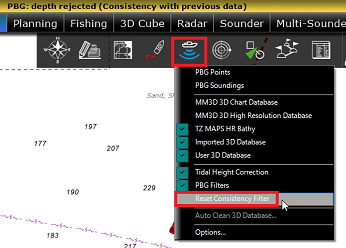
When the filter rejects data while PBG recording is active, TimeZero displays the following notification: “PBG: data rejected (Consistency with previous data)” or “PBG: data rejected (Consistency with 3D database)”
Fixed Data Rejection
The Fixed Data Rejection filter is designed to prevent invalid depth data from being recorded when a sounder repeatedly outputs the exact same depth value over multiple consecutive measurements.
Some sounders, when they lose bottom lock, may continue to transmit a fixed depth value rather than indicating signal loss. This behavior can result in long sequences of incorrect depth data being recorded. You can configure how many consecutive identical depth values are allowed before rejection occurs (3, 5, 10, or 20 repeats).
Under normal conditions, even in very flat areas, genuine depth measurements typically exhibit small natural variations. As a result, this filter usually does not interfere with valid data recording in flat seabed regions. However, because this behavior is not common to all sounders and the filter may not be effective in every installation, the Fixed Data Rejection filter is disabled by default. It is recommended primarily for systems known to repeat fixed depth values when bottom detection is lost.
When the filter rejects data while PBG recording is active, TimeZero displays the following notification: “PBG: data rejected (depth value is constant)”