Displaying Fish Finder
To display the Fish Finder screen on TZ iBoat , tap on the Sounder button located next to the TZ button:
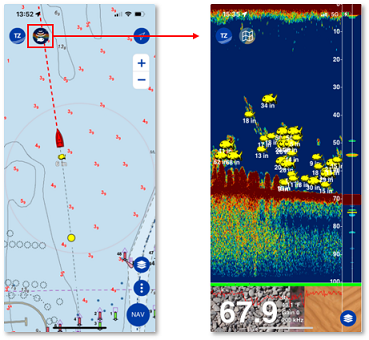
Note: To revert back to the chart screen, simply tap on the Map button that replaces the Sounder button when you are on the sounder screen. At this time, it is not possible to display a chart screen and a sounder screen side by side.
Sounder screen overview
|
1. Sounder Echo: The sounder picture moves from right to left. Echo on the far right represents "real time" return (what is picked up by the transducer under your boat). With each new transmission, sounder echoes are shifted to the left creating the sounder history. Note that the sounder history is "time based" (bottom profile will appear flat if the boat stays stationary).
|
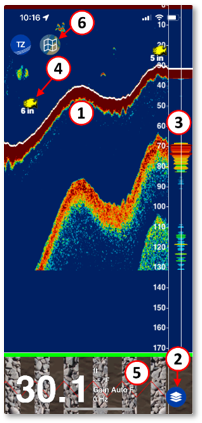 |
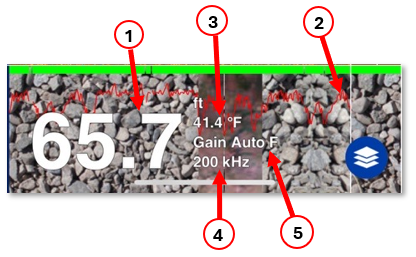
1. Depth Indicator: Indicates the depth sent by the sounder.
2. Bottom Discrimination probability curve: Provides an indication of the reliability of the seabed detection.
3. Temperature Graph: Indicates the water temperature at the transducer (Sea Surface Temperature).
4. Frequency Indication : Indicates the transducer operating frequency.
5. Gain Mode Indication: Indicates the Gain Mode ("Manual" for manual gain adjustment, "Auto F" for fishing mode, and "Auto C" for cruising mode),
Configure the Sounder Screen
Tap the Layer button to open the Layers panel and access the most common sounder setup:
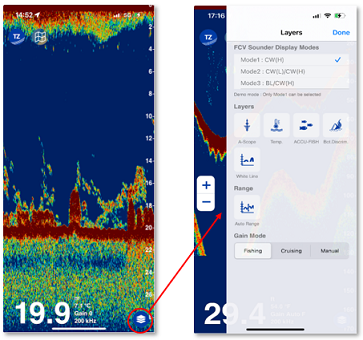
FCV Display Modes
The FCV600/800 can operate in various "modes" (single frequency, dual frequency, bottom lock...). These modes can be selected directly from TZ iBoat under the Layers panel and be synchronized over to the FCV600/800:
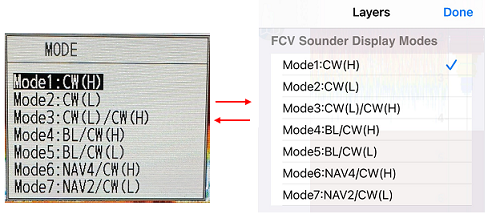
Note: For a more detailed explanation of all the FCV600/800 modes, please refer to the Furuno user's guide.
Sounder Screen Layers
It is possible to add or remove various fish-finder components or layers to your sounder screen. You will find various options under the Layers panel:
A-Scope
The A-Scope shows the echo return under the transducer in real time. The amplitude (width) and the color vary with the echo strength making the A-Scope useful for estimating fish return and bottom composition:
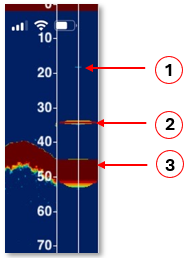 |
1. Weak reflection (Fish or noise) 2. Strong reflection (Fish) 3. Strong reflection (Bottom) |
If the echoes displayed in the A-Scope disappear too fast, you can enable the A-Scope Peak Hold from the Fish Finder Settings.
The A-Scope selection is independent on TZ iBoat and on the FCV600/800 (not synchronized).
Temperature Graph
If your transducer includes a temperature sensor, it is possible to overlay a temperature graph to the sounder screen from the Layers panel:
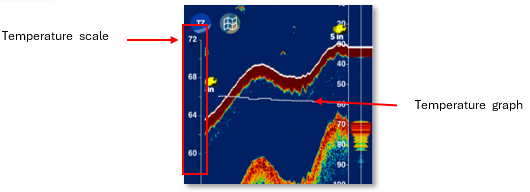
The temperature graph is useful to monitor small changes in temperature over time that could act as barriers for fish movements and affect feeding patterns.
The Temperature Graph selection is independent on TZ iBoat and on the FCV600/800 (not synchronized).
ACCU-Fish
If your transducer is compatible with the ACCU-Fish feature, you can enable it under the Layers panel of TZ iBoat:
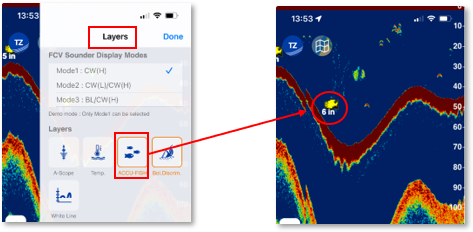
ACCU-Fish is designed to help anglers assess the size of fish detected on the screen. When ACCU-Fish is activated, fish icons with a label indicating the sizes will appear on the fish finder's display, representing the estimated size of the detected fish. These icons can help anglers quickly identify potentially larger fish targets amidst smaller ones, allowing them to prioritize their fishing efforts. Note that the accuracy of ACCU-Fish may vary depending on factors such as water conditions, the sensitivity of the transducer, and the quality of the transducer installation. While it can provide helpful guidance, anglers should use their judgment and experience in conjunction with ACCU-Fish readings to interpret fish size accurately.
Note that the ACCU-Fish icon can be selected from the Fish Finder Settings under ACCU-Fish Symbols:
| Label only | Solid | Striped | Circle | Square |
 |
 |
 |
 |
 |
The ACCU-Fish selection on TZ iBoat is synchronized with the FCV600/800 and changes the TX pulse length (which can affect the sensitivity of the sounder).
Bottom Discrimination
The bottom discrimination feature analyses the bottom echo to categorize seabed in one of four types: rock, gravel, sand, and mud. Note that a transducer that supports the bottom discrimination is required.
You can enable the Bottom Discrimination from the Layers panel in TZ iBoat. This will display the seabed type below the sounder echogram:
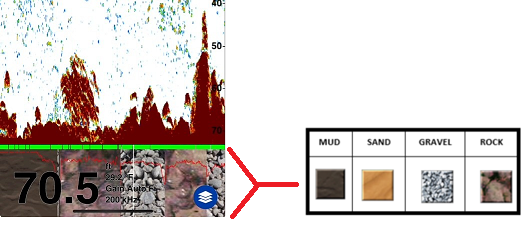
A confidence indicator and a probability graph are also displayed:
- The confidence indicator can be either green (normal) or yellow (caution). The confidence indicator is displayed at the top of the bottom discrimination texture.
- The probability graph gives you the probability of the corresponding seabed type (the higher the red line, the more confident the result is). Note that you can tap on the seabed type to get more detail about the probability of each category:
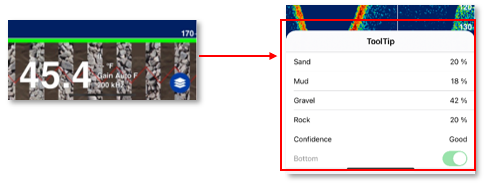
The Bottom Discrimination selection on TZ iBoat is synchronized with the FCV600/800 and alternates the transmission of high and low frequency (regardless of the current mode selection) which causes the refresh rate to be slower. When enabled, the bottom discrimination also set the Auto-Range of the FCV600/800 (manual range is not possible). Also note that the operating depth of the bottom discrimination feature is in between 16 to 328ft (5 to 100m) and its operating speed is less than 10 knots.
White Line
The White Line function makes it easy to see the bottom location on the sounder echo. It also makes it easy to distinguish bottom fish from the seabed (bottom fish echo would be displayed above the white line):
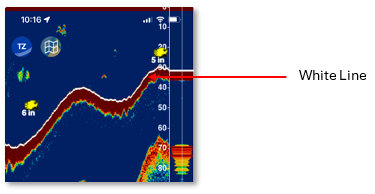
The White Line selection is independent on TZ iBoat and on the FCV600/800 (not synchronized).
Sounder history
TZ iBoat records sounder history (up to 10,000 sweep). To access the sounder history, position your finger on the screen and then drag the sounder picture to the right. The range of the sounder history will automatically scale to what is displayed on your screen.
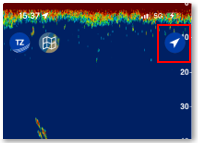
When you display the echo history, the echogram scrolling stops. To return to the current position (to restart the scrolling of the echogram display), click on the button at the top right of your screen:
Geo-location
ACCU-Fish
When the ACCU-Fish mode is enabled, fishes that are detected by the FCV600/800 will appear on the sounder screen, but also on the chart screen (if the ACCU-Fish layer is also enabled on the chart screen):
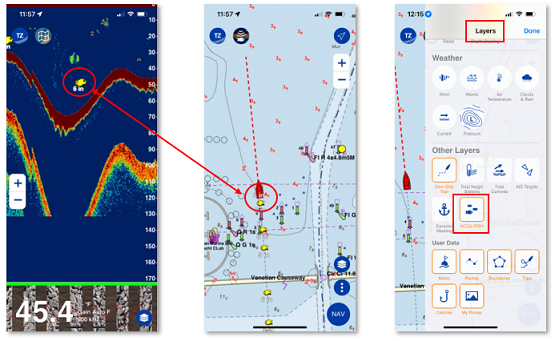
This unique feature of TZ iBoat makes it very easy to circle back and place your boat over the fish.
Mark
If you tap on the sounder screen to create a mark, the mark will also be displayed on the chart screen automatically:
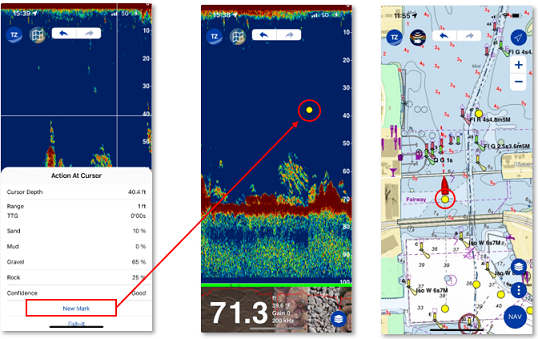
This feature makes it very easy to save reef and obstruction location that are easily identified on the fish finder screen. You can also use this feature to manually mark the position of a fish.
Information menu
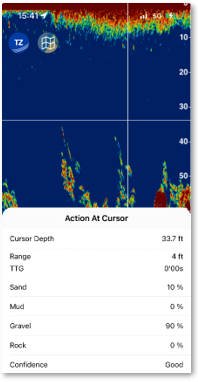
Whenever you tap on the sounder screen, the pop-up menu will display the information below:
- The depth at the tapped location.
- The range (distance) from your boat to the tapped location.
- TTG: the "time to go" it will take you to get to the tapped location if you go straight at keep current speed.
- The different possible bottom type with their corresponding probability (in percentage) when the Bottom Discrimination feature is enabled.
Background and Echo color display
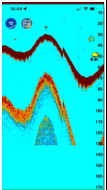
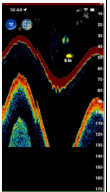
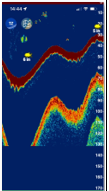
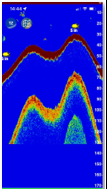
The sounder screen can use the following combination of background and echo color:
| White | Light Blue | Black | Dark Blue | Blue | Sunlight |
 |
 |
 |
 |
 |
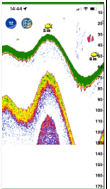 |
The color palette can be selected from the Fish Finder Settings. You can select one palette for the day time and another for the nigh time.