Fish Finder Adjustments
The FCV600/800 has been designed to work in Auto mode (Auto Gain and Auto Range). However, advanced users may find it useful to manually adjust some of the FCV600/800 parameters.
Range & Shift
Manual Range
The FCV600/800 can operate in Auto Range or Manual Range. When set to Auto Range, the FCV600/800 will automatically adjust the range to always display the seabed on screen. However, if you want to focus on specific area of the water column or prevent the FCV600/800 to automatically change its range, you can disable the Auto Range from the Layers panel in TZ iBoat.
When the Auto Range is disabled, a "+" and "- " buttons will appear to manually change the range:
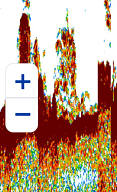
It is also possible to use the pinch gesture to adjust the range.
Note: If the Bottom Discrimination function is enabled, the range is forced to Auto Range. If you set the FCV600
Manual Shift
To shift the echo picture and focus on a specific area of the water column, simply drag up and down.
Gain Mode
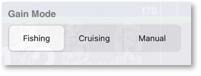
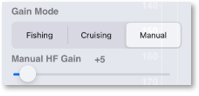
User can choose between 3 modes to control the fish finder gain: Fishing, Cruising, and manual. The gain mode can be adjusted from the Layers panel of TZ iBoat:
Automatic Modes (Fishing & Cruising)
There are two types of automatic modes: "Fishing" and "Cruising". The Automatic Fishing mode optimizes the sounder to display schools of fish, while the Auto Cruising mode optimizes the sounder to detect the bottom. Note that the Auto Cruising mode uses a higher clutter removal setting than "Auto Fishing". Do not use "Auto Cruising" when your purpose is to find fish, because the clutter removal circuit can erase weak echoes.
When the Automatic Fishing or Cruising mode is enabled, manual adjustment of the gain, clutter, and TVG is not possible.
Tip: According to your transducer model and installation, you may find the auto mode to be too "strong" or too "weak". In this case, you can try to adjust the Auto Gain Offset from the Fish Finder Settings.
Manual Mode
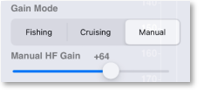
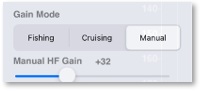
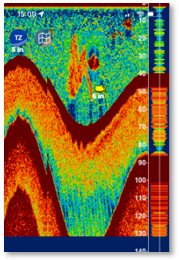
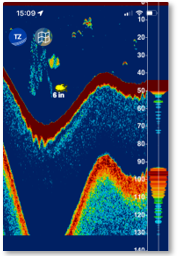
If you prefer to have manual control of the Fish Finder gain, you may select the "Manual" mode. A slider will appear allowing you to manually change the gain:
| Gain too high | Proper gain | Gain too low |
 |
 |
 |
 |
 |
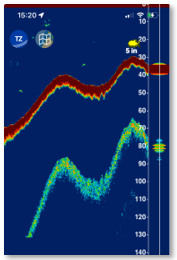 |
Thanks to the DIGI-Echo technology, the manual gain adjustments will affect both future and past echoes (sounder history).
Note: While the manual gain mode selection is synchronized in between the FCV600/800 and TZ iBoat, the manual gain value (slider adjustment) is independent.
Clutter
When manually adjusting the gain, it might be difficult to find a good balance in between noise caused by sediments in the water (which may force you to use a lower gain) and having strong fish returns (which may force you to use a higher gain). To handle this scenario you may want to try to adjust the clutter from the Fish Finder Settings: keep a higher gain, but increase the clutter setting to see if the noise is getting removed.
Interference Rejection
Interference from other nearby fish finders or other electronic equipment on your boat may show itself on your sounder screen as shown in the figure below:
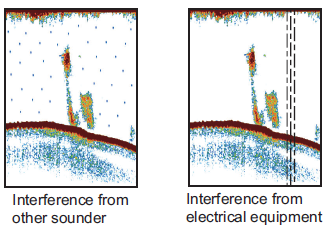
If you see these patterns on your sounder screen, you may want to adjust the Interference Rejection from the Fish Finder Settings. There are 3 manual settings (low, medium, high) and one automatic setting.
Note: If you do not experience any interference, it is always better to set this setting to "Off". If you do experience any interference, try the "Auto" setting first.
Color Erase
If you would like to erase weak echo that could be caused by sediments or plankton in the water and only care about strong return, you can try to adjust the "Color Erase" from the Fish Finder Settings. Raising the Color Erase slider will simply erase from the real time return and the sounder history any weak echo.