Online or Offline mode
These are the two modes for retrieving oceanographic data.
TZ iBoat lets you display weather forecasts in two different ways: in “Online” mode, oceanographic data is displayed directly on your device in real time. in “Offline” mode, data must be downloaded.
The "Online" mode, which is enabled by default, is very convenient as it allows you to view any area and instantly access oceanographic forecasts. However, an internet connection is required.
If you're heading out to sea and expect to be in an area without an Internet connection, you should switch to “Offline” mode, then download a specific area before departure (for more information, refer to “Downloading ocean forecasts” Chapter).
Switching between “Online” and “Offline” is done automatically, depending on the available Internet connection. However, certain settings can be made manually in the parameters if you wish to force the “Offline” mode.
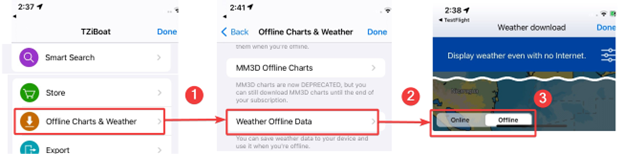
You can change mode at any time by selecting “Offline Charts & Weather” under the “TZ” button located on the top left of your screen, then selecting “Offline weather data” (1) and switching from “Online” to “Offline” (2) in the bottom left-hand corner of the screen.
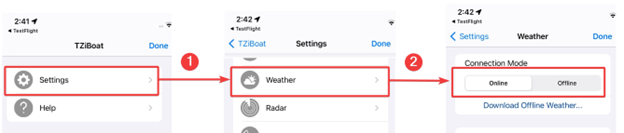
You can also change the connection mode (2) in the Weather settings (1) under the “TZ” button located on the top left of your screen.