Data Source
The Data Source page displays a matrix view of all configured inputs and outputs and allows you to review the configuration and assign port priorities when more than one port provides the same type of data.
All data types supported by TimeZero (such as position, heading, speed, etc.) are listed in the first column. Before this page is displayed, TimeZero analyzes all configured inputs. For each data type and port combination, the Data Source page indicates one of the following states:
- Unselected: the data type is not configured or not available on that port
- Selected & Detected: the data type is configured and valid data is being received
- Selected: the data type is configured but no valid data is currently detected
When the same data type is selected on more than one port, a drop-down menu in the Master column allows you to choose which port should be used as the primary data source for that data type in TimeZero:
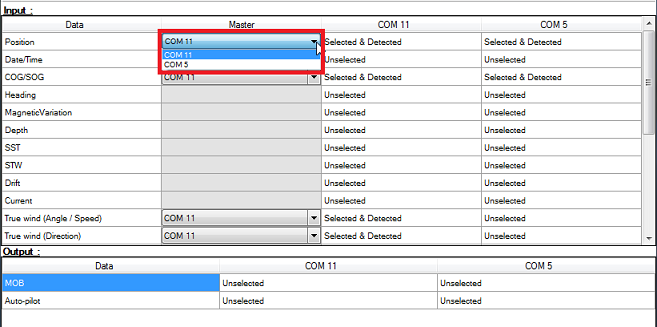
If the selected Master source becomes unavailable, TimeZero automatically switches to another available source. When the Master source becomes available again, TimeZero automatically reverts to it without requiring user intervention.
This behavior allows the system to be configured with full sensor redundancy, provided multiple data sources are available (for example, multiple GPS receivers).
Note: For NMEA2000 data, all information is received through a single port (via the Actisense GAteway). Individual device priority cannot be set directly in the Data Source page. Instead, TimeZero determines priority based on the NMEA2000 device instance number, where the device with the lowest instance number has the highest priority. Refer to the How to Adjust Priority on NMEA 2000 section for more details.