Dead Reckoning
In the event of a GNSS (GPS) failure such as interference, spoofing, or jamming, TimeZero’s Dead Reckoning feature can be used to estimate the vessel’s position. When operating in manual mode, if Speed Through Water and/or Heading data are unavailable, the operator can manually enter the vessel’s speed and course using the Dead Reckoning NavData.
When Heading data (from a magnetic compass or gyrocompass) and Speed Through Water data (a Doppler sensor is recommended) are available, TimeZero automatically computes the estimated position, using Heading as COG and Speed Through Water as SOG. Even when a valid GNSS position is available, the Dead Reckoning position can continue running in the background to detect inconsistencies. If a discrepancy is detected, the user is prompted to manually confirm the vessel’s position.
Finally, when TimeZero is connected to a compatible Furuno radar, the radar overlay can be used to refine the position. The operator can simply drag the vessel icon until the radar overlay aligns with the coastline or with known targets such as AIS contacts or buoys.
Configuring Dead Reckoning
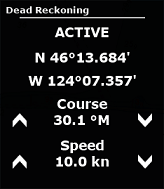
To enable Dead Reckoning (disabled by default), select Allow Dead Reckoning from the Initial Setup options. Once enabled, you can add the Dead Reckoning NavData, which allows you to monitor the Dead Reckoning status and, in Manual Mode, adjust the vessel’s speed and/or course:
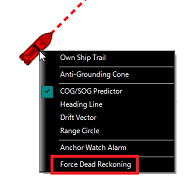
Dead Reckoning is automatically activated when TimeZero loses the GPS position. It can also be activated manually by right-clicking the Own Ship icon and forcing Dead Reckoning mode:
To operate Dead Reckoning in Automatic Mode, you must configure a heading sensor that does not rely on GNSS data, as well as a Speed Through Water sensor.
Note: If you are using a satellite compass that provides GPS, its heading data can be used and configured as the master heading source, provided that a backup heading sensor (such as a magnetic compass) is configured on a separate NMEA 0183 port.
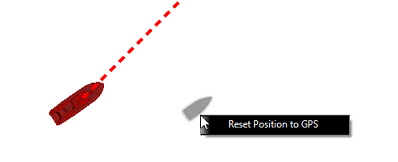
In Automatic Mode (when Heading and Speed Through Water data are available), a Dead Reckoning Ghost Ship can be displayed by enabling Display Dead Reckoning Ghost Ship in the Initial Setup menu. The Ghost Ship position is continuously updated based on the vessel’s previous confirmed position, heading, and speed through water. The Ghost Ship appears as a small black vessel icon and becomes visible when the difference between the GPS position and the Dead Reckoning position is significant on screen (zooming in may be required). To reset the Ghost Ship position to the current GPS position, right-click the Ghost Ship icon and select Reset Position to GPS:
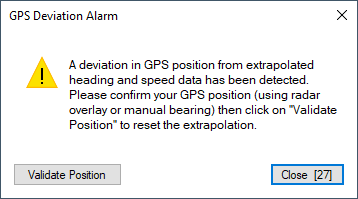
Optionally, you can enable Monitor for GPS Deviation. When enabled, TimeZero monitors the distance between the GPS position and the Ghost Ship position computed from Heading and Speed Through Water. If this distance exceeds the configured deviation threshold, an alarm is triggered and the user is prompted to confirm the vessel’s position:
Dead Reckoning Operating Mode
When Heading and/or Speed Through Water are not configured in TimeZero, Dead Reckoning operates in Manual Mode, requiring the operator to manually enter the vessel’s speed and course using the Dead Reckoning NavData. The vessel’s last valid GPS speed and course are automatically used as the initial values.
When Heading and Speed Through Water are configured, these sensor values are automatically used for Dead Reckoning calculations. In this case, the speed and course fields in the Dead Reckoning NavData are read-only and cannot be manually edited.
Note: If the transverse water speed is available, TimeZero will also use that information to update the Dead Reckoning Position.
When the GPS position is lost, triggering the activation of Dead Reckoning, or when Dead Reckoning is manually forced, the vessel’s last valid Position, Speed and Course (SOG and COG) are automatically used as the initial Dead Reckoning values.
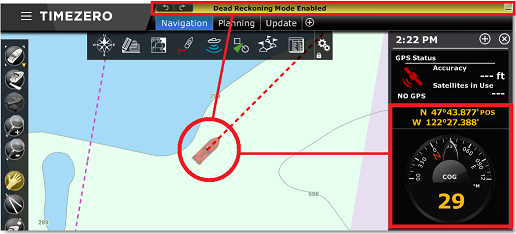
When the Dead Reckoning mode is enabled, a notification will be displayed in the status bar, the boat icon will start to flash slowly and the GPS Position, COG, and SOG NavData values (if configured) will be displayed in yellow to indicate the data is being estimated:
In the presence of current or wind, the Dead Reckoning position estimate may become increasingly inaccurate over time, as drift effects cannot be fully accounted for. If you are able to manually determine an updated position and have a reliable latitude and longitude, you can reinitialize and validate the vessel’s position by right-clicking the Own Ship icon and selecting Move Own Ship by Lat/Lon. This opens a dialog allowing you to manually enter a new position.
Alternatively, when connected to a compatible Furuno radar providing an Ethernet radar video feed, the radar overlay can be used to refine the vessel’s position. Simply drag the Own Ship icon until the radar overlay aligns with the coastline or with known targets such as AIS contacts or buoys:
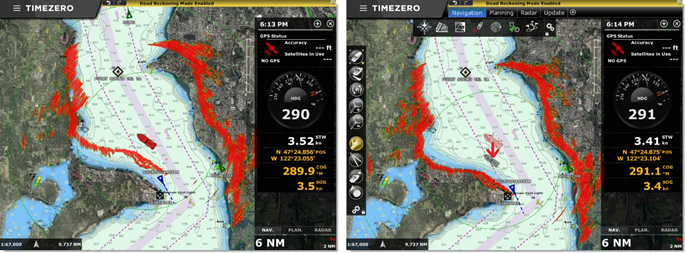
After the position has been adjusted using the radar overlay, TimeZero continues to automatically estimate the newly refined position until further corrections are required due to current or wind effects.
Once TimeZero receives a valid position again, Dead Reckoning mode is automatically disabled.