System Configuration
This chapter summarizes the configuration that needs to be done on the local station (with TZ Coastal Monitoring Single or Dual Radar) and on the control center (with TZ Coastal Monitoring Remote).
Local Station
The sensors (Radar, AIS, Camera, ....) need to be connected and fully configured on TZ Coastal Monitoring Single or Dual Radar. Here is an overview of the steps (please refer to the appropriate Installation Chapter for more detailed):
-
Configure the Ethernet Card connected to the local sensors (Radar, Camera,...) with the appropriate IP (usually 172.31.3.150 /255.255.0.0)
-
Configure the second Ethernet Card so that the computer can access the TZ Host (usually configure an Internet connection)
-
Open TZ Coastal Monitoring Single or Dual Radar and set the "Default Reference Position", "Station ID" and "Station Name" from the TZ Host Options. Usually, the coordinate of the Station is used for the Reference Position. Make sure that the "Station ID" is unique
-
If an AIS is connected to the computer, use the Connection Wizard to configure the Port
-
If Camera(s) is (are) connected to the computer, configure them from the Camera Options
-
From the Radar Options, setup the Radar Position and Orientation (you can use the Radar Overlay to align the Radar echo on the chart)
-
Setup Radar Mask to remove radar echo generated by land and other fixed objects
-
Setup ARPA Auto Acquisition so that the Station can generate ARPA targets. TZ Coastal Monitoring Remote does not have the ability to generate ARPA targets from the Radar Echo, and this task is deferred to the local station (because the local station has access to the raw high resolution radar picture).
-
Make sure that the TZ Host is up and running, enter the public IP address of the computer running the TZ Host and press the "Connect" button from the TZ Host Options:
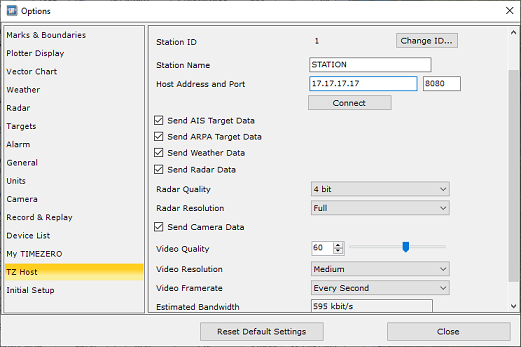
-
If the Local Station is used by an operator, rules should be configured on TZ Coastal Monitoring Single or Dual Radar. Note that rules are independent per computer, and the notifications/alarms they may trigger are not shared on the network (rules should be set manually on all computers). This allows to have independent rules and independent behaviors on multiple computers (for example, the local operator might not need the same rules as the remote operator). If the computer located on the local station does not have any operator, there is no need to configure "Rules".
Control Center
There is not much configuration needed on the Control Center (TZ Coastal Monitoring Remote) beside the Rules (that are independent per computer) and setting the Initial Reference Position. When connecting to the TZ Host, all sensor configuration (Radar Position, Orientation, Target Data, Cameras,...) will be done automatically as soon as TZ Coastal Monitoring Remote is connected to the TZ Host via the TZ Host Options.